
A friend sent me a screenshot of two charges she didn't recognize. Both said OpenAI. Both were pizza. This post is about how that happens, and why my agent, which did everything right, still couldn't have found it.
The text
Linda handles the card for a small company I help build. Her card pays for a few of our services, and she can't see inside any of them, which is fair. She doesn't write code. She just gets the bills. So when two charges showed up in Google Wallet labeled OpenAI, she texted me: are we using OpenAI for the project? I'm getting bills I don't recognize.
The screenshot had the OpenAI logo, the knot one everybody knows. Two charges on the same day in late September, $184.37 and $97.12, both on her business card ending in 4417.
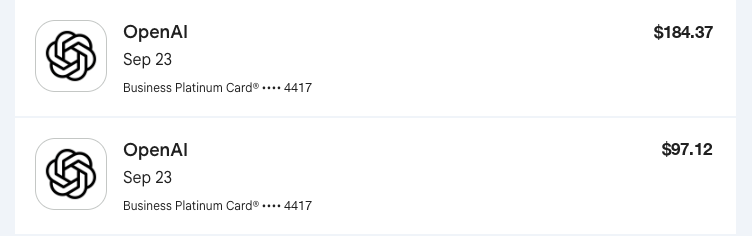
The screenshot Linda sent me. I changed the amounts and the card number.
That's a reasonable question to ask me, and a bad one to guess at. I didn't know offhand. So I asked my agent.
What the agent did
My agent has access to my notes, my code, and the settings for the services we run. I asked it whether we were paying OpenAI for anything on that project. It went and looked.
It searched every copy of the project's code it could reach. No OpenAI calls. It checked the hosting settings for an OpenAI key. None. It pulled up a decision I'd made a few days earlier: every AI call for this project goes through one gateway that bills one account, so any AI spend would show up on that bill, not as a separate OpenAI charge. It checked my own OpenAI use too. Mine bills my account, not hers.
Then it wrote me a reply to send her. "Not from anything I've built." And it told me what it couldn't check: my partner Jordan's laptop, and any OpenAI account someone might have opened with her card. It asked for the one thing that would settle it, the account email on the bill.
That is a good answer. It said what it checked, what it didn't, and what it needed next. I'd take that from a person any day.
It was also aimed at the wrong question. It answered "is this ours?" Correctly. No. But nothing it could see would have told it what the charge actually was.
What it actually was
Linda filed a fraud report. Then she looked closer, and the answer showed up on her Amex statement, not in Google Wallet. On the Amex side, the charges had a restaurant's name on them. A pizza place. Same amounts, same day. She had ordered from them, and she thinks she paid on the restaurant's own website.
Same charge, two apps, two different names. Amex said pizza place. Google Wallet said OpenAI.
Her theory, texted to me with some feeling: the pizza place probably had an AI build their website, so OpenAI is basically processing their payments. A great example, she said, of how AI-built stuff can make a lot of confusion.
She's right about the confusion. I don't think she's right about the cause. So I went and looked.
Open, not OpenAI
I pulled up the restaurant's ordering page and checked where it loads from. The menu, the cart, and the checkout don't come from the restaurant's own server. They come from a company called Open. Open sells restaurants their own online ordering, so they don't have to give a cut to the delivery apps. Its home page calls it "The AI-Native Platform for Restaurants."
So the restaurant's checkout runs on a company called Open. And Google Wallet showed the charge as OpenAI.
I can't prove the next step, and I want to be straight about that. Google doesn't publish how Wallet decides which name and logo to put on a charge. What I can say is this. Your bank gets a short line of text with every card charge, called a descriptor. Apps like Google Wallet take that raw text and try to match it to a real business so they can show you a clean name and a logo. Google's own help page for Wallet transactions says merchants don't always share full details, and to contact the merchant if a charge looks off. People report the wrong merchant name in Wallet often enough to have a thread about it.
When a lot of small businesses take cards through one platform, the descriptor often starts with the platform's name, then the shop. Square does this with "SQ *" and the business name, and documents it. A matching engine that sees something like "OPEN" up front, and has seen a million OpenAI charges, has an easy wrong guess sitting right there.
That's my best theory. It fits everything we saw. I couldn't confirm the exact descriptor on Linda's charge, and I couldn't confirm which payment processor sits under Open. If you know, I'd like to hear it.
The part I love: it's still an AI company. Just not that one. Linda's instinct that AI had something to do with it wasn't crazy. Two companies with "Open" in their name, both selling AI, and one app couldn't tell them apart. Codex didn't process her pizza. A name did.
Why the agent couldn't find it
This is the part I keep thinking about.
My agent checked everything it had access to, and everything it had access to was ours. The code, the settings, my notes, my decisions. It could prove what we weren't paying for. It couldn't see Linda's Amex account. It couldn't see her order history at a pizza place. It had no reason to look at the restaurant's website, because nobody had mentioned a restaurant.
The answer lived in her statement, not in our systems. One click in the Amex app solved what a careful search of every repo couldn't.
I don't count that as a failure. The agent did the right thing: it said what it couldn't check, and it asked for the one piece of data that would settle it. If I'd sent that reply and she'd pulled up the account email, she'd have found no OpenAI account at all, and the next question would have been "then what is it?" That's where the restaurant would have come up.
But it's a good reminder of where these tools are strong and where they're blind. An agent with access to your stuff is very good at "is this ours?" It is no help at all with "what is this?" when the answer lives in somebody else's account.
What to check when an AI charge shows up
If you see a charge labeled OpenAI, ChatGPT, Anthropic, or any AI company you don't remember paying, do this before you file a fraud report:
- Open the card company's own app or statement, not your wallet app. Google Wallet, Apple Wallet, and budgeting apps all clean up the raw charge text. Your card issuer shows you what the merchant actually sent. That's the version that counts.
- Match the amount and date to anything you bought. An odd-cents total like $184.37 looks more like a food order with tax and tip than a software plan. Software plans tend to be round numbers.
- Look for a prefix before an asterisk. Something like "SQ " or "TST" means a payment platform took the card for a smaller business. The name after the asterisk is the business.
- If it really is the AI company, find the account. Real OpenAI billing comes with a receipt sent to an email address. Search your inbox, and anyone's inbox who might have used the card.
Linda filed her fraud report before any of this came out. That's the real cost of a wrong label. A restaurant that did nothing wrong gets a dispute, and the person holding the card loses an afternoon. All over a logo.